
Software development used to be the exclusive territory of programmers. If you wanted to build an app, you either hired a developer or learned to code. That's no longer the case.
Today, more tools are giving everyday business users the ability to create software without needing programming skills. These tools are called no-code platforms, and they're reshaping how organizations build, automate, and innovate.
According to Gartner, 70% of new enterprise applications will use no-code or low-code technology by 2026, up from less than 25% in 2020. This is not a small shift. It is a major change in how software is built.
If you are looking to understand no-code platforms, this guide will help you learn how they work and whether they are the right fit for your goals.
What is a no-code platform?
A no-code platform is software that lets people build applications, websites, and automated workflows without writing code.
Instead of programming manually, users create digital products through visual interfaces using drag-and-drop tools, forms, and prebuilt components.
Under the hood, the platform handles the technical complexity and generates the underlying code automatically. Users interact with a simple visual interface while the system manages the programming in the background.
You can think of traditional coding as building furniture from raw materials, while no-code is more like assembling a ready-made kit with prebuilt parts.
How does a no-code platform work?
No-code platforms work by abstracting away the complexity of traditional programming. Instead of dealing with languages, syntax, or logic structures, users work with pre-built components and visual editors that represent what they want the app to do.
The build process typically follows four stages:
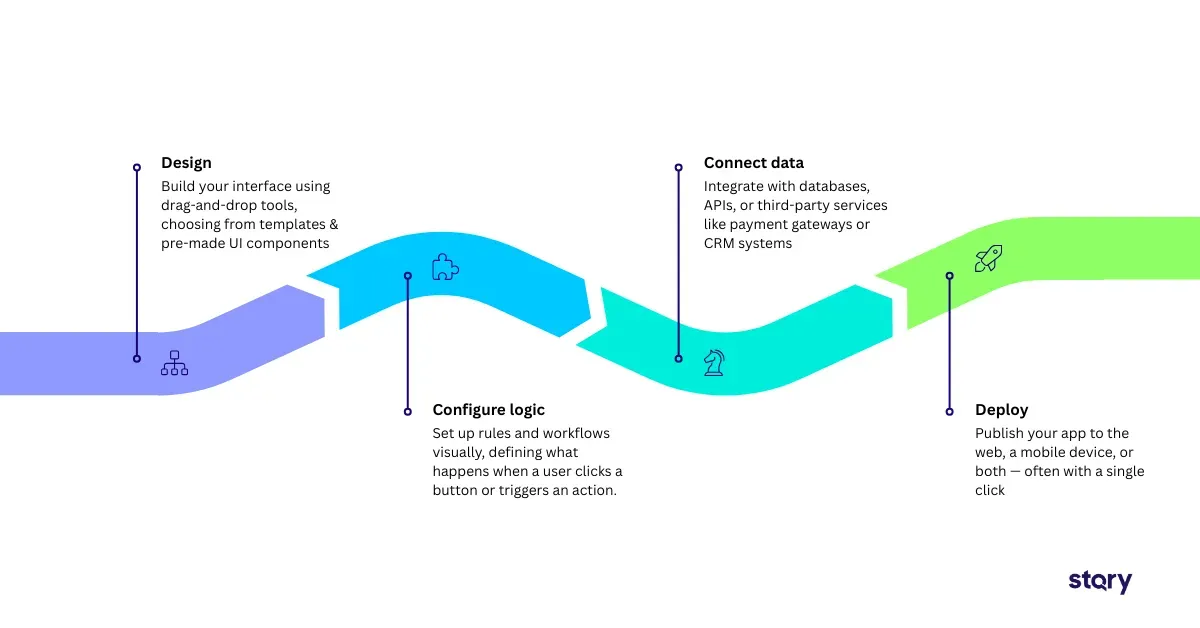
- Design: Build your interface using drag-and-drop tools, choosing from templates and pre-made UI components.
- Configure logic: Set up rules and workflows visually, defining what happens when a user clicks a button, submits a form, or triggers an action.
- Connect data: Integrate with databases, APIs, or third-party services like payment gateways or CRM systems.
- Deploy: Publish your app to the web, a mobile device, or both — often with a single click.
Most platforms include a visual workflow engine, a drag-and-drop UI builder, pre-built templates, an integration layer, and a deployment environment.
It's worth noting that the underlying code still exists. It's just generated and maintained by the platform vendor, not the user
No-Code vs. Low-Code vs. Traditional Development
No-code is often mentioned in the same breath as low-code and traditional development. They're related, but they serve very different purposes.
No-code is built for non-technical users. Everything is visual. There's no coding required at any stage. This makes it ideal for business teams who want to build departmental tools, simple apps, or automated workflows without involving IT.
Low-code platforms still use visual tools, but they assume some coding knowledge. Developers use them to speed up their workflow, extending visual components with custom code where needed. They're better suited for enterprise integrations and more complex applications.
Traditional development gives developers full control. It's the most flexible option, but also the most time-intensive and expensive. It remains the go-to for mission-critical, highly customized systems.
The table below compares no-code, low-code, and traditional development across key factors such as audience, coding requirements, speed, flexibility, best use cases, and cost.
| No-Code | Low-Code | Traditional |
|---|---|---|
| Non-technical users | Developers + tech-savvy teams | Developers |
| None | Some | Full |
| Fastest | Fast | Slowest |
| Limited | Moderate | Highest |
| Quick wins, departmental apps | Enterprise integrations | Complex custom systems |
| Lowest | Moderate | Highest |
What are the benefits of no-code platforms?
The appeal of no-code goes beyond convenience. For many organizations, these platforms are delivering measurable, bottom-line results.
Speed
One of the biggest advantages is how fast you can go from idea to working product. Organizations report up to a 90% reduction in development time, compressing what might have taken months into days or weeks. For teams that need to move quickly, that's transformational.
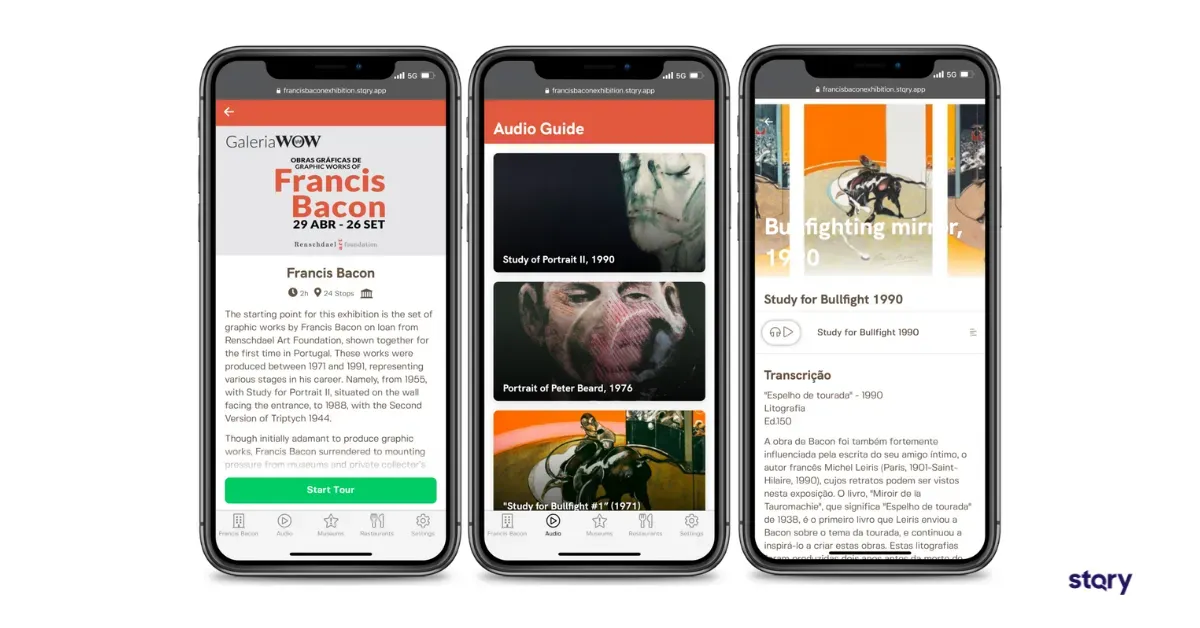
For example, World of Wine, a cultural district in Porto, Portugal, needed a mobile app for a Francis Bacon art exhibit. Using STQRY's no-code platform, they went from concept to a fully launched app in just three weeks.
Without no-code, the same project would have taken six months at a minimum. That's the speed advantage in action: not just faster, but a fundamentally different timeline.
Cost Savings
Building software the traditional way is expensive. No-code dramatically reduces that burden. On average, organizations save around $187,000 per year, with most seeing a payback period of just 6 to 12 months.
The World of Wine story puts that into sharp relief. A custom-built app for their Francis Bacon exhibit would have cost $90,000 or more upfront, plus at least $12,000 in annual maintenance fees every year after that.
With STQRY's no-code platform, that same app costs between $2,000 and $5,000 per year. No large initial investment, no ongoing developer retainer.
Democratization
No-code puts the power of development into the hands of people who understand the problem best — not just those who know how to code.
Globally, somewhere between 1100 and 120 million non-technical users are now actively building business applications through no-code tools. These users are often called citizen developers. They include operations managers, HR leaders, marketers, and finance teams who create solutions on their own instead of waiting for IT support.
Reduced IT Bottlenecks
When business teams can build their own tools, IT departments are freed up for more complex, strategic work. No more backlogs. No more waiting weeks for a simple form or dashboard.
In many organizations, IT teams are already overloaded. A marketing team that needs a landing page should not have to wait in line for support.
No-code lets these teams build what they need on their own, while IT can focus on more technical and complex work.
Digital Transformation Enabler
McKinsey research shows that companies adopting low-code and no-code platforms score 33% higher on innovation metrics compared to those that haven't made the shift. That gap makes sense when you think about what no-code actually unlocks.
When more people in a company can build and improve tools, testing new ideas becomes faster and less expensive. Projects that may have stayed in a backlog for months can be launched in days.
Over time, this speed gives businesses a real competitive advantage by helping them respond to market changes more quickly.
Enterprise-Readiness
Modern no-code platforms have grown up. Many now offer SOC 2, GDPR, and HIPAA compliance features. This makes them viable for organizations with serious security and regulatory requirements.
This is a significant shift from the early days of no-code, when enterprise IT teams were right to be cautious about adopting these tools.
What are the limitations and challenges of no-code platforms?
No-code platforms are powerful, but they're not a silver bullet. Understanding their limitations is just as important as knowing their strengths.
Vendor Lock-In
When you build on a no-code platform, the underlying code belongs to the vendor. You typically can't export or modify it outside of that environment. If the platform shuts down or changes its pricing, migrating your app can be difficult.
Complexity Ceiling
No-code platforms work best for simple to moderately complex applications. But when workflows become highly complex or require deep integration with older systems, their limitations start to show. In those cases, low-code platforms or traditional development are usually a better fit.
Scalability Concerns
Not all platforms are built to scale. Before committing, it's worth evaluating whether the platform can handle your growth in terms of users, data volume, and performance requirements.
The bottom line is that no-code does not replace experienced developers. It supports them by handling simpler tasks so developers can focus on more complex work that requires their expert
What can you build with a no-code platform?
The range of what you can build with no-code tools is broader than most people expect.
1. Web and Mobile Apps
From simple internal tools to full customer-facing apps, no-code platforms can create cloud-based, web-based, and increasingly native mobile applications.
A clear example is the visitor experience space, where cultural institutions use no-code app builders to launch self-guided tour apps in weeks instead of months.
2. Websites and Landing Pages
Platforms like Wix have made it possible for small business owners to create professional websites without touching a line of HTML or CSS.
Instead of having to learn custom HTML and CSS (which was required 15+ years ago) in order to develop a website, users only need to select a template and then drag and drop different elements, such as images, text, and icons, in order to design each page.
The code is happening on the backend, but Wix automatically creates that code based on the user’s actions.
3. Business Process Automation
Repetitive tasks like expense approvals, employee onboarding workflows, and data entry processes are ideal candidates for no-code automation. Setting up a trigger-and-action workflow can replace hours of manual work each week.
4. Internal Tools
Dashboards, KPI trackers, inventory management systems are the kinds of tools that teams need but rarely make it to the top of a developer's priority list. No-code makes it possible for the team that needs the tool to build it themselves.
5. Customer Portals and Self-Service Applications
Organizations can build branded portals where customers manage accounts, get support, and track orders without a full development project.
For example, a SaaS company can use no-code tools like Glide or Softr to create a client portal. Users can log in, view usage data, submit support tickets, and manage billing in one place.
What used to take a full development sprint can now be built in a few days.
6. E-commerce Stores
Platforms like Shopify let businesses build online stores with product listings, payments, and inventory management without custom code.
For example, a small business selling handmade goods can launch a branded storefront using Shopify. They can connect a payment gateway, set up shipping rules, and start taking orders.
7. Learning Management Systems (LMS)
Training programs, onboarding courses, and progress tracking tools can all be built and managed using no-code platforms. This makes L&D teams more self-sufficient.
Teams can create and manage onboarding programs with features like video modules, quizzes, and completion tracking without needing IT support.
When policies change or new content is needed, updates can be made quickly in minutes.
What is the role of AI in no-code development?
If no-code democratized software development, AI is now accelerating that shift even further.
The no-code AI platform market shows how quickly this space is growing. It's projected to grow from $8.6 billion in 2026 to $75.14 billion by 2034, with a compound annual growth rate of more than 31%. Growth at that level reflects a major change in how businesses build and use technology.
A growing trend in the industry is AI-native no-code platforms. These tools let users describe what they want to build in plain language, and the platform automatically creates the app, logic, and interface.
Early examples include Bolt.new, Replit Agent, and v0. Instead of dragging and dropping components, users can type a prompt like “Build me a booking app for a photography studio,” and the platform generates the application automatically.
This does not make traditional no-code platforms obsolete. Instead, it expands what no-code can do by moving from visual building to conversational building.
The skills needed to create software keep decreasing, while the speed of development keeps increasing.
What Is STQRY and How Does It Use No-Code for Museums, Tours, and Visitor Experiences?
Most people think of no-code in terms of general business tools. But some of the most compelling examples come from niche, purpose-built platforms that serve a specific industry exceptionally well. STQRY is one of them.
Founded in 2006, STQRY has become a leading digital storytelling and tour management platform. It is designed for museums, galleries, parks, universities, heritage sites, and tour operators that want to create mobile guided tours, interactive maps, and location-based experiences without needing a development team.
The STQRY Builder is entirely web-based. If you can use a web browser, you can use it.
Staff can design and launch visitor experiences through a simple, customizable interface, uploading and updating images, audio, video, text, or augmented reality content instantly. No developer required. No waiting on IT. Just publish and go.
STQRY offers more than a basic content editor. It helps organizations create interactive visitor experiences without technical skills.
Some key features include:
- Geofencing for location-based content
- Gamification with badges and quizzes to engage visitors
- Push notifications and in-app navigation
- Support for 50+ languages
- Accessibility features like voiceover and image descriptions
- Full offline access
- Automatic text-to-speech for audio guides
For any organization in the visitor experience space, STQRY is a textbook example of what a purpose-built no-code platform looks like.
FAQs
Is ChatGPT a no-code platform?
ChatGPT is a conversational AI tool, not an application builder. It can help with writing code, brainstorming features, and generating content. However, it does not provide a visual environment for building and deploying apps.
What's the difference between no-code platforms and AI-driven builders?
Traditional no-code platforms use drag-and-drop tools and visual editors. AI-driven app builders go further. You describe what you want in plain language, and the AI creates the app structure, logic, and interface.
What skills are needed for no-code?
Most no-code platforms are built so anyone who can use a web browser or tools like Google Slides can get started.
Basic understanding of how apps and workflows work can help, but no programming knowledge is required.
For more advanced use cases, knowing data relationships and API integrations can be useful. Many platforms also provide tutorials and templates to make it easier.
Build Your Own Visitor Experience With STQRY’s No-Code Platform
No-code has made software development accessible to everyone. STQRY takes this further for museums, galleries, heritage sites, and tour operators. Our no-code platform is built for organizations that want to share stories and engage visitors.
Teams can create and manage mobile apps, self-guided tours, interactive kiosks, and digital archives without coding. No developer is needed, and there are no long development timelines.
Ready to bring your visitor experience to life without code?