
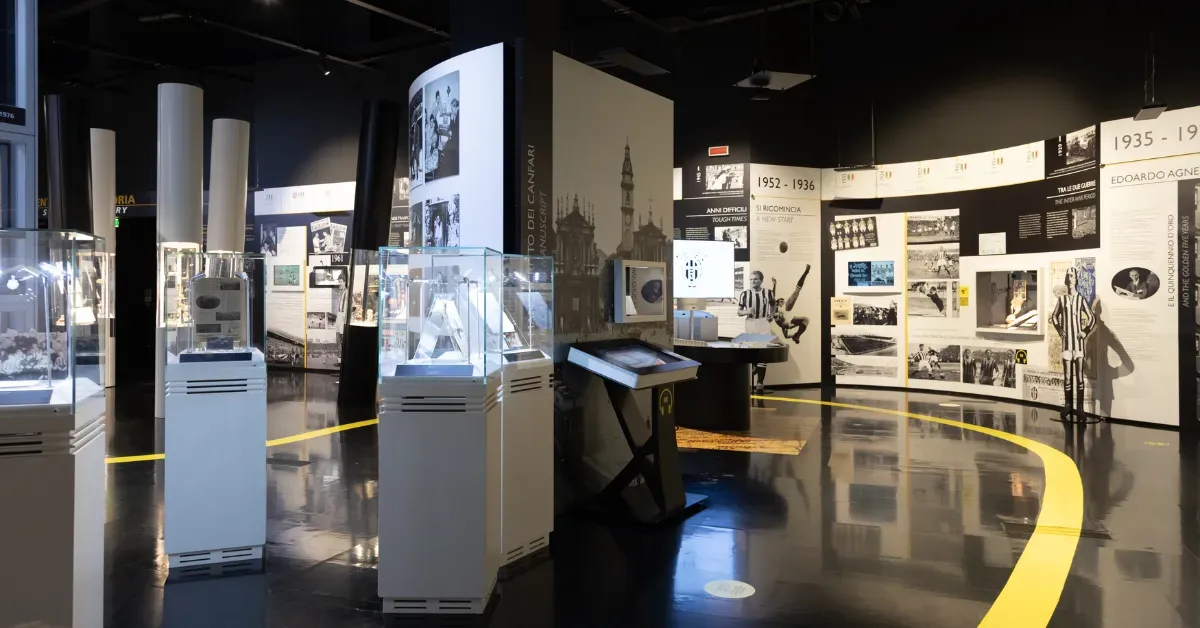
According to industry reports, over 60% of museum visitors feel confused or frustrated because of unclear signage or layouts.
This is not just a small issue as it gets in the way of the visitor experience you have worked hard to create.
The good news? Wayfinding is one of the most fixable problems in the visitor experience. With the right system in place, you can turn a confusing visit into a seamless, memorable journey.
In this blog post, we'll walk you through everything you need to know about museum wayfinding.
What Is Museum Wayfinding?
Museum wayfinding is the system that helps visitors navigate a museum confidently from entry to exit.
When done right, it reduces confusion, keeps visitors engaged, and ensures they experience more of what the museum has to offer.
An effective museum wayfinding system is built on five key elements:
- Clear, consistent signage placed at decision points
- Entrance orientation — maps or guides given on arrival
- Digital tools such as apps or interactive displays
- Intuitive spatial design that naturally guides movement
- Well-positioned staff who can assist in real time
Together, these elements ensure visitors spend less time lost and more time connecting with your collection.
Why Museum Wayfinding Often Fails
Poor museum wayfinding has a few root causes. Here are the most common ones.
Complex Layouts and Historic Buildings
Many museums were not designed for easy navigation. Historic buildings, in particular, were originally built for other uses like homes or government spaces.
When they were turned into museums, they kept layouts that can feel confusing to visitors.
Even newer museums can have this problem. Multiple wings, changing exhibits, and several floors can make it hard for visitors to understand where they are or where to go next.
Without a clear layout, it is easy to get lost.
Over-Reliance on Signage
Signs help, but they can’t do everything. Many museums rely too much on printed signs and ignore other guides like lighting, layout, colors, and floor patterns. If a sign is missing or unclear, visitors can get lost.
A peer-reviewed integrative review found that people navigate interior environments using a combination of spatial memory, landmark recognition, and environmental cues.
In short, people don’t navigate by reading every sign. Instead, they integrate visual landmarks, spatial memory, and other environmental cues to orient themselves.
Relying on signage alone ignores how humans naturally wayfind and learn complex spaces.
Inconsistent Naming and Labeling
Small details can have a big impact. If a gallery is called "East Wing" on the map, "Gallery 3" on the sign, and "The Heritage Collection" online, visitors quickly get confused.
Inconsistent names across maps, signs, and websites make it harder for people to navigate.
Lack of Visitor-Centered Design
One of the main problems is that many museum wayfinding systems are designed from the staff’s perspective, not the visitor’s. What seems obvious to employees can be confusing to first-time guests.
Visitor-centered design means testing with real people, observing how they move, asking what confuses them, and adjusting the system based on actual behavior.
5 Principles of Effective Museum Wayfinding
Good wayfinding isn't accidental. It's built on a clear set of principles that work together.
1. Clarity at decision points
A decision point is any spot where a visitor must choose a direction, like an entrance, stairwell, or corridor junction. These are the best places for signs, maps, or digital guides to help visitors move confidently.
You don’t need signs everywhere — just the right sign in the right place at the right time.
2. Consistency across all touchpoints
Every part of wayfinding should feel like it belongs to the same system. The website, printed floor plan, and gallery signs should use the same visuals and naming.
Information should also follow a consistent order. When everything matches, visitors trust the system and can navigate easily.
3. Visibility without distraction
Good signage is easy to spot but doesn't compete with the exhibits. It respects the visual environment while still being functional. This is a delicate balance, but it's essential.
Wayfinding that clutters a space can make navigation harder. It also distracts from the museum’s atmosphere.
Clear, simple guidance helps visitors move easily while preserving the experience.
4. Accessibility and inclusivity
Effective wayfinding works for everyone, regardless of age, ability, or language. This means designing with low vision, mobility challenges, and cognitive differences in mind from the very beginning.
Accessibility isn't a feature you add at the end. It's a principle you build around.
5. Integration with architecture and storytelling
The best wayfinding systems do more than just direct visitors. They use the building itself, such as sight lines, natural light, and spatial cues, to guide people naturally. This approach makes navigation intuitive and reduces visitor frustration.
Sometimes, wayfinding even becomes part of the museum’s story.
Using Digital Tools to Transform Museum Wayfinding
Today's visitors expect more than a printed map. Digital tools and mobile technologies help museums meet that expectation and go well beyond what physical signage can do on its own.
Digital Kiosks
Digital museum kiosks let visitors explore exhibit layouts before starting their visit. They can be installed throughout the museum floor to show visitors their exact location in real time. This is especially valuable in large, multi-level institutions where finding a specific gallery can otherwise feel overwhelming.
STQRY Kiosk have made this kind of experience far more accessible for museums of all sizes. It allows museums to:
- Set up interactive touchscreen displays
- Combine digital wayfinding
- Provide exhibit information
- Offer multilingual support
- Enable visitor feedback
- Manage everything from a single content system
Visitors can tap to see their location, get directions, or explore exhibit content without downloading a separate app.
Self-Guided Tours
Self-guided tours let visitors explore a museum on their own while receiving content through an app. Instead of waiting for a guide or following a set schedule, visitors move at their own pace while the app delivers the right content at the right moment.
The technology behind this is geofencing and Bluetooth beacons.
Geofencing sets a virtual boundary using GPS, so when a visitor crosses it, the app automatically shows related content like audio, video, or exhibit information.
Bluetooth beacons work in a similar way but are designed for indoor use. GPS signals are weaker inside buildings, so small beacon devices are placed throughout the museum. They connect to visitors’ phones when they come within range, typically between 5 and 50 meters.
STQRY Apps is designed specifically for this kind of experience. Museums can use it to create fully branded self-guided tour apps that engage visitors and deliver content seamlessly.
The platform supports multimedia, interactive maps, and location-based triggers, letting visitors explore at their own pace.
It also offers multilingual support and analytics, giving museums insights into visitor behavior and preferences.
Push Notifications
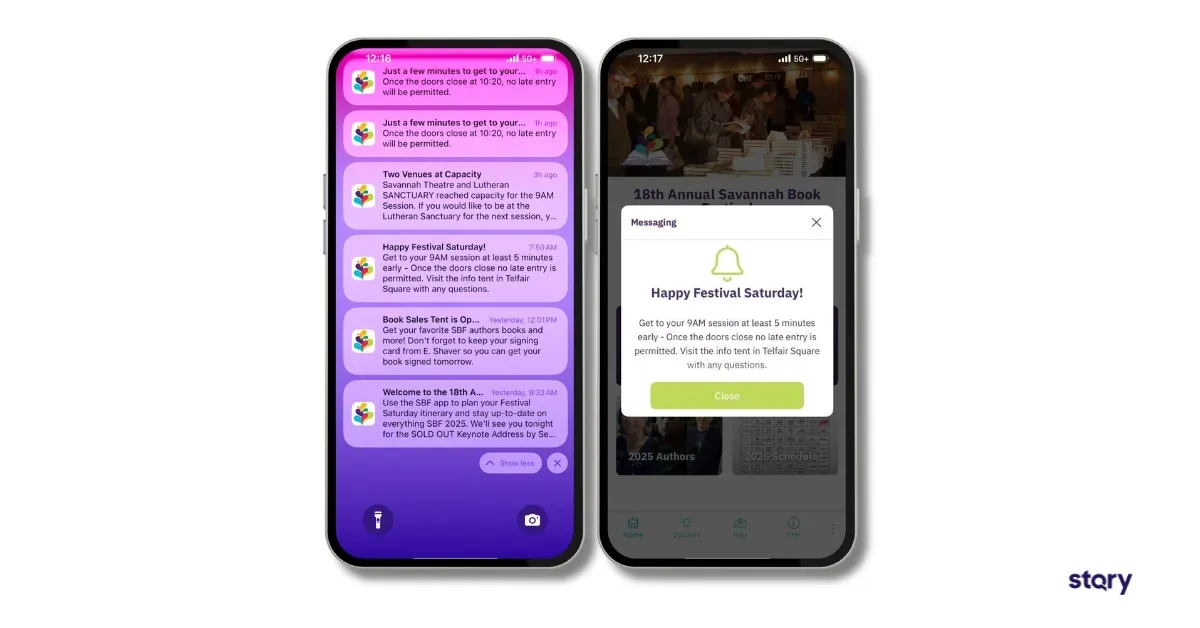
Push notifications add another layer of real-time guidance without requiring visitors to constantly check their phones
When integrated with a self-guided tour app, they can alert visitors to temporary closures, crowd buildup in certain wings, or time-sensitive events happening nearby.
A good example is the Savannah Book Festival, where organizers used STQRY to send real-time push notifications to over 9,000 attendees across multiple venues.
The attendees received real-time session reminders, capacity updates, and wayfinding tips. The result was a smoother, more organized experience with less stress for both visitors and staff.
QR Codes
QR codes placed at key points throughout the museum give visitors instant access to maps, exhibit details, and guided prompts without requiring a dedicated app download.
Combined with location-based triggers, they can deliver contextual information the moment a visitor reaches a specific exhibit or area.
It's a low-cost, high-impact tool that fits naturally into the modern visitor experience.
5 Wayfinding Design Best Practices for Museums
Knowing the principles is one thing. Putting them into practice is another. Here are the design strategies that make the biggest difference.
1. Use minimal but strategic signage
More signs don't mean better navigation. Focus on quality and placement over quantity. A well-positioned sign at a key decision point is worth ten signs scattered randomly throughout a hall.
2. Align with museum branding
Wayfinding should feel like a natural part of the museum’s visual identity. It should use consistent typography, colors, and tone. This reinforces trust and professionalism while keeping the experience cohesive.
3. Place signs at key decision points
As a rule of thumb, signage should appear wherever a visitor needs to make a directional choice. Entrance foyers, stairwells, gallery thresholds, and major corridors are your priority locations.
4. Use lighting and spatial cues
Lighting is one of the most underused wayfinding tools in museums. Brighter pathways naturally draw movement. Focused lighting on exhibit entrances signals importance. Strategic use of light and shadow can guide flow without a single word.
5. Combine physical and digital guidance
The most effective systems blend both. Physical signage provides immediate, always-on orientation. Digital tools offer depth, flexibility, and personalization. Together, they create a layered experience that serves every type of visitor.
Accessibility in Museum Wayfinding
An inclusive wayfinding system is essential, not optional. Museums serve visitors of all ages and abilities, and everyone should be able to navigate confidently. This means designing for vision, mobility, cognitive, and language needs from the start, not as an afterthought.
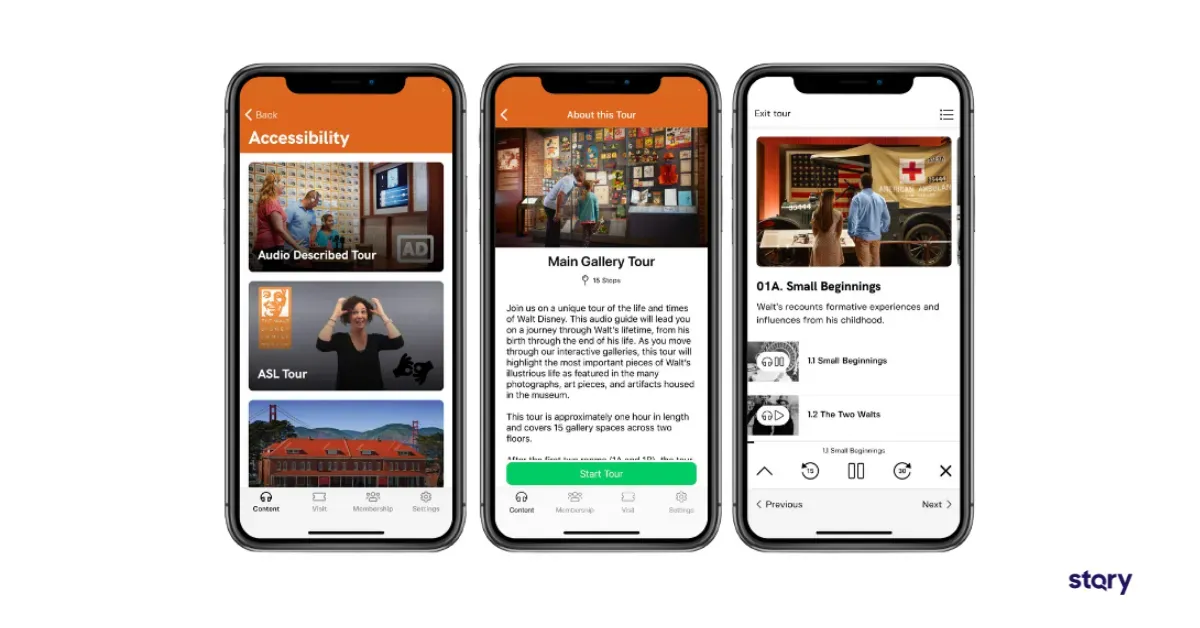
A compelling example of this in practice is the Walt Disney Family Museum. The museum partnered with STQRY to make their galleries more inclusive for visitors with disabilities and non-English speakers.
The STQRY-powered app included a full American Sign Language tour for deaf and hard-of-hearing visitors. It offered an audio guide for guests who are blind or have low vision and a social story with panoramic photos to help visitors on the autism spectrum prepare for their visit.
The app was also translated into 11 languages to serve the museum’s global audience.
According to Tracie Timmer, Senior Public Programs Coordinator at the Walt Disney Family Museum:
The goal of the project was to create an app to improve the accessibility of our galleries, particularly for non-English speakers and guests with disabilities.
The museum received direct feedback from accessibility communities praising the improvements.
Improve Your Museum Wayfinding With STQRY
Museum wayfinding is one of those things visitors only notice when it goes wrong. But when it goes right, it lets the visitor experience take center stage.
STQRY is built for museums that want to get wayfinding right. With our no-code platform, museums can create self-guided tour apps, set up interactive kiosks, and manage digital signage. Our customer success team is also there every step of the way to ensure everything runs smoothly.
Ready to make your museum easier to navigate?