
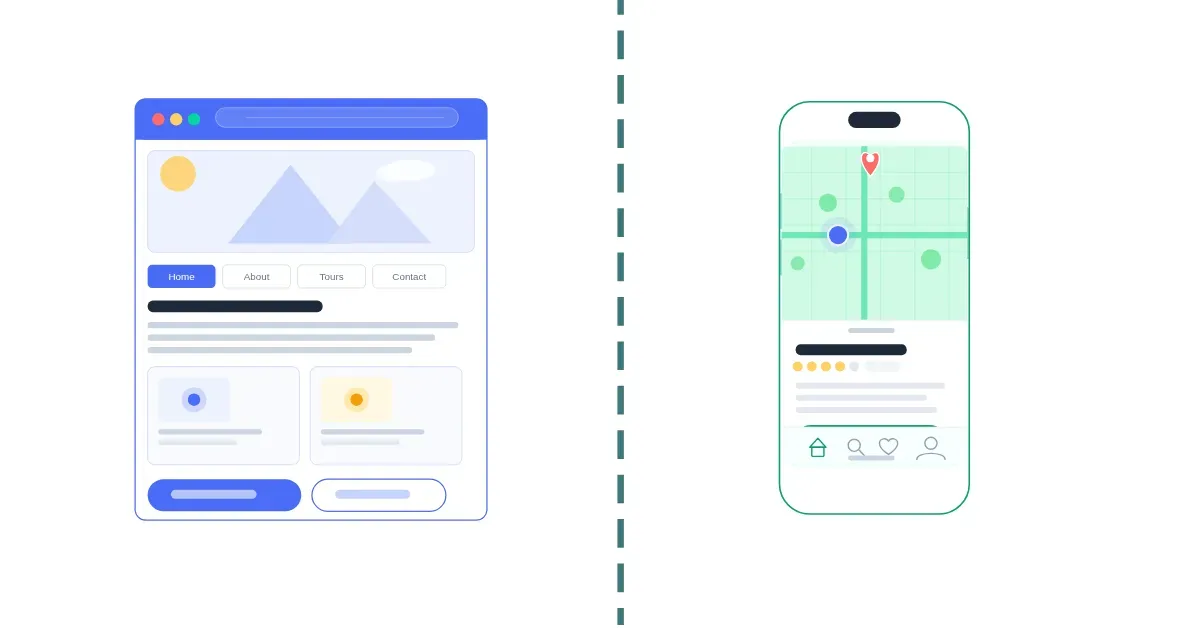
Every business building a digital product eventually faces the same decision, native app or web app? It may look like a technical choice, but it is really a strategic one. It affects your budget, timeline, audience reach, and how users engage with your product over time.
The stakes are high. Users spend an average of 3.6 hours per day inside mobile apps, and global consumer spending on apps passed $167 billion in 2025.
At the same time, web apps power major products like Figma, Notion, and Shopify, reaching users across devices without app store submissions.
Both approaches work and neither is universally better. The right choice depends on what you are building, who it is for, and what the product needs to do.
If you are deciding between the two, this guide breaks down the key differences between native apps and web apps.
What is a native app?
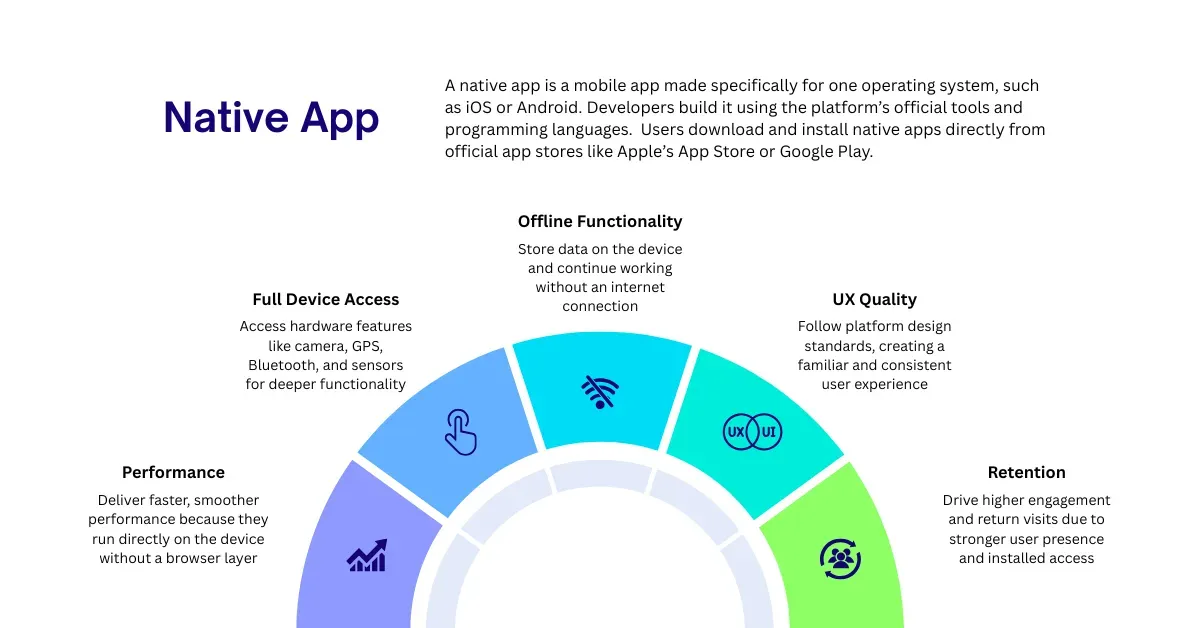
A native app is a mobile app built specifically for one operating system, such as iOS or Android. Developers create these apps using the platform’s official tools and programming languages. iOS apps are built with Swift or Objective-C, while Android apps use Kotlin or Java.
Users download native apps directly from app stores like Apple’s App Store or Google Play and install them on their devices.
Because native apps are designed for a specific platform, they work closely with the operating system and device hardware. This allows them to support platform features like Face ID on iPhone, Android gestures, push notifications, GPS, and camera access more smoothly.
Native apps power many of the world’s most popular apps, including Instagram, Spotify, Google Maps, and mobile banking apps.
They are also commonly used for mobile guide apps in museums, parks, universities, cities, and other destinations. These apps can include images, text, audio, and location-based features that rely on direct access to device hardware.
How do native apps work?
When developers build a native app, the code is converted into a format the device can run directly. Unlike a web app that runs inside a browser, a native app runs directly on the operating system, allowing the device to process the app more efficiently.
Native apps are a strong choice for fast, secure, and feature-rich mobile experiences.
What are the key advantages of native apps?
Native apps have a significant edge in several areas that matter most to businesses building for mobile. Here's what they do particularly well:
1. Performance
Native apps are known for their speed and smooth performance. Because they run directly on the device and access system features without a browser, they respond faster and handle complex tasks more efficiently
According to a study published by Adobe, app sessions last around 2–3× longer than equivalent mobile web sessions.
2. Full Device Access
A native app can access built-in device features like the camera, GPS, Bluetooth, Face ID, and push notifications. It can also use the microphone and motion sensors.
This is important for self-guided tour apps that deliver content based on a visitor’s location in places like museums, parks, and university campuses.
3. Offline Functionality
Native apps can store data directly on the device and continue working without an internet connection. Users can download content like audio guides, maps, and exhibit information ahead of time.
Offline access is especially useful in remote parks, underground spaces, and other areas with limited connectivity.
4. UX Quality
Native apps follow the design standards of their platform. iOS apps use Apple’s Human Interface Guidelines, while Android apps follow Google’s Material Design system.
Users get a more familiar experience because the gestures, navigation, and interactions match other apps on the device.
5. Retention
Native apps often drive stronger user engagement than mobile websites. According to research, shopping apps convert users at around 3× the rate of mobile web, and 54% of mobile commerce transactions happen inside apps instead of browsers.
Users who install an app are also more likely to return because the app stays on their device and can send notifications.
What are the drawbacks of native apps?
Native apps are not the right choice for every situation. The same platform depth that makes them powerful also creates real constraints, especially around cost, control, and speed of iteration.
Adoption
One of the biggest challenges with native apps is adoption. Before users can benefit from the experience, they need to find, download, and install the app. Every extra step in that process can reduce participation, especially among first-time or casual users.
Custom Development Requirements
Building a native app from scratch can require significant time, resources, and budget. Organizations often need separate development, testing, and maintenance for iOS and Android. This can increase costs and make projects more complex and time-consuming.
However, building a native app from scratch is not always necessary. Platforms such as STQRY make it possible to launch and manage native self-guided tour apps without custom development.
Platform Lock-In
Building natively means committing to Apple and Google’s ecosystems, including their rules, timelines, and policy decisions.
According to Apple’s 2024 App Store Transparency Report, 146,747 developer accounts were terminated, mostly for fraud-related violations.
Changes to app store policies or review processes can directly impact apps, sometimes with little notice or flexibility.
App Store Commission
Both Apple and Google take a 15–30% commission on in-app purchases and subscriptions processed through their payment systems.
The standard rate is 30%, which drops to 15% for small developers earning under $1 million per year or after the first year of a subscription.
For apps with significant in-app revenue, this can be a major ongoing cost that web apps avoid by processing payments directly.
Longer Update Cycle
Shipping an update to a native app is not as simple as pushing a change to a server. Every update must go through app store review, which can take 24 hours to several days.
After approval, users still need to download the update on their device. This means some users may continue using older versions of the app.
For fast-moving teams, this creates more friction compared to web apps, which update instantly for all users when changes are deployed.
What is a web app?
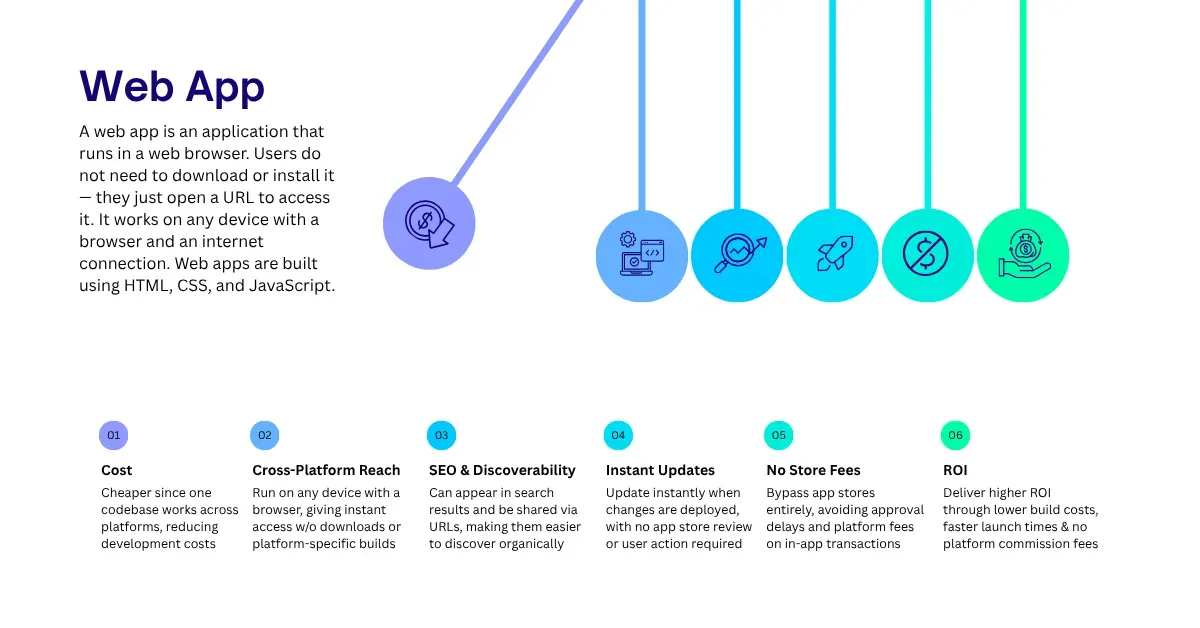
A web app is an application that runs in a web browser. Users do not need to download or install it — they just open a URL to access it. It works on any device with a browser and an internet connection. Web apps are built using HTML, CSS, and JavaScript.
You likely use web apps every day. Gmail, Google Docs, Notion, Figma, Trello, and Shopify are all web apps.
Unlike simple websites, web apps are interactive and stateful. They respond to user input, save data, and connect to other services. This makes them feel more like software than static pages.
Because web apps run on servers and load through a browser, they work across all major platforms including Windows, macOS, iOS, and Android using a single codebase.
How do web apps work?
When a user opens a web app, their browser sends a request to a remote server. The server responds with the app’s code, including HTML, CSS, and JavaScript. The browser then renders it and runs the application.
Depending on the design, some processing happens in the browser, some on the server, or both.
Modern web apps usually use one of two approaches:
- Server-side rendering (SSR): The server builds the page and sends ready-to-view HTML to the browser. This helps with fast initial loading and is useful for SEO, especially for content-heavy sites.
- Single-page applications (SPAs): The app loads once in the browser and then updates dynamically as the user interacts. This reduces full page reloads and creates a smoother experience. Frameworks like React, Vue, and Angular support this approach.
Many web apps combine both methods. They use server-side rendering for speed and SEO, then switch to client-side updates for a more interactive experience.
What are the key advantages of web apps?
Web apps have closed much of the gap with native apps in recent years and, in some areas, they now lead. Here are the key areas where they consistently outperform native apps.
1. Higher Adoption
The biggest advantage of web apps is that they require no download. Visitors can access them instantly through a browser. This removes the single biggest barrier to adoption that native apps face.
2. Cost
Web apps are generally cheaper to build than native apps. Development typically costs between $8,000 and $60,000, compared to $20,000 to $950,000+ for native apps.
This is because one web codebase works across all platforms, so there is no need for separate iOS and Android versions.
According to research aggregated by Lovable, web apps can cost 50–70% less to build than comparable dual-platform native apps.
3. Cross-Platform Reach from a Single Codebase
A web app written once runs on any device with a browser, including desktops, laptops, smartphones, tablets, and smart TVs. Users do not need to download or install anything.
There are also no platform compatibility issues to manage. This makes web apps a strong choice for products that need to reach users across many devices or for teams that cannot maintain separate iOS and Android apps.
4. SEO and Discoverability
Web apps can be indexed by search engines like Google. Their pages can appear in search results, be shared through URLs, and be discovered by users who have never heard of the product before.
According to a study by Google, 1 in 4 app users discovers new apps through search engines.
5. Instant Updates
Updating a web app means pushing changes to a server. Users get the new version the next time they load the app, with no action needed. There is no app store review or approval delay.
For fast-moving teams, this makes it easier to fix bugs and run experiments quickly.
6. No App Store Gatekeeping or Commission
Web apps do not go through app stores. There are no submission rules, no review process delays, and no risk of rejection. They also avoid app store fees.
Apple and Google charge 15–30% on in-app purchases, while web apps can take payments directly through providers like Stripe at much lower costs.
7. ROI
The return on investment for web app development is well documented. Businesses investing in web apps often see 3×–5× ROI, driven by subscription revenue, e-commerce sales, and process automation.
Lower upfront costs, faster time to market, and no platform commissions all contribute to a faster payback period compared to native app development.
What are the drawbacks of web apps?
Web apps are not without limitations. For all their accessibility and cost advantages, there are real trade-offs that can matter depending on what your product needs to do.
Requires an Internet Connection
Web apps need a network connection to work. Without internet access, they will not load. Some exceptions exist if offline features are added using service workers, often in progressive web apps (PWAs).
For most web apps, losing connection means the app stops working. This can be a major limitation in low-connectivity environments such as remote areas, underground spaces, or regions with unstable mobile data.
Limited Device Access
Web apps run inside a browser sandbox, which restricts access to device hardware. They cannot fully access features like Bluetooth, NFC, the file system, background processing, or biometric authentication in the same way native apps can.
Some browser APIs, such as WebBluetooth, WebNFC, File System Access, and WebRTC, help bridge this gap. However, native apps still offer broader and deeper hardware integration.
Performance Ceiling
Even the best-optimized web app runs inside a browser, which adds an extra layer between the app and the device’s processor.
For most business apps, this is not noticeable. However, it can matter for high-performance use cases like 3D graphics, real-time audio, or heavy animations where timing is critical.
Native apps compile directly to device code and run on the hardware without the browser layer.
Security Responsibility Falls Entirely on the Developer
Native apps go through a baseline security review from Apple and Google as part of the app store submission process.
Web apps do not have a similar gate, so developers are fully responsible for securing them against issues like cross-site scripting (XSS), cross-site request forgery (CSRF), and insecure authentication.
This does not mean web apps are less secure, but security must be intentionally designed and maintained from the start. The impact of security failures is significant.
According to IBM’s Cost of a Data Breach Report, the global average cost of a data breach reached $4.88 million in 2024, a 10% increase year over year.
Lower User Retention Compared to Native Apps
Web app users do not have a home screen icon or a persistent presence on the device. They are also less likely to receive push notifications that bring them back into the product.
As a result, mobile web users typically spend less time per session than native app users.
For consumer apps where retention matters, this makes it harder to build repeat engagement and long-term usage.
Building a mobile guide app? STQRY lets you choose or offer both
For most businesses, the native vs web app decision is an either/or. For museums, parks, universities, and cultural destinations, it doesn't have to be.
STQRY is a purpose-built platform for creating mobile guide apps. It's designed to solve exactly the problem this article has been unpacking.
You don't need a development team, a six-figure budget, or months of build time to get there. STQRY's no-code platform lets any team add images, text, audio, maps, and custom features through a simple web interface. Publish changes instantly at any time, without going back through an app store review.
The platform supports museums and galleries, parks and forests, universities, local cities and regions, and many other destination types. It includes full accessibility features, support for over 50 languages, and GPS and Bluetooth beacon triggers for location-aware experiences.
If you want your own branded presence in the app stores, STQRY offers fully white-labelled native apps published under your name.
The native vs web debate doesn't have to be a constraint. With STQRY, it's a choice.